

What if the quickest iPhone repair isn’t the right one for your device? A cracked screen, fast-draining battery or charging fault needs more than a part swap. You need a clear diagnosis, a repair plan you understand and confidence about what happens to your data and warranty.
It’s reasonable to want to know how long a repair may take, who will handle your iPhone and what happens if the fault returns. This guide explains what a useful diagnosis should establish, how technician credentials and warranty coverage help you assess a service, and how to choose a practical repair path without guesswork.
At Royal Step Computers Solutions, Apple-certified technicians diagnose iPhone faults before repair work begins. Diagnosis is free, same-day service is available, and repairs come with a 90-day warranty. Royal Step Computers Solutions serves customers across all seven emirates of the UAE. Read on to learn what to check, how to prepare your device and how Royal Step Computers Solutions can help restore it.
Key Takeaways
- Choose iphone repair based on a clear diagnosis and repair scope, not just speed or a quoted part replacement.
- Similar symptoms can have different causes, so a technician should assess the device before recommending work.
- Apple-certified technician credentials and Apple-authorised provider status are different claims. Knowing the distinction helps you compare service routes.
- Back up important data, note the fault symptoms and record any accessories you hand over to keep the repair process clear.
- Before collecting your iPhone, review the completed work, test key functions and understand the warranty coverage for the repair.
IPhone Repair in the UAE: What a Reliable Service Should Provide
A phone that won’t charge, a screen that won’t respond or a battery that drains quickly can interrupt work and daily plans. Choosing an iphone repair service doesn’t have to add uncertainty. Look for a diagnosis before work begins, a clearly explained repair scope, capable technicians and specific aftercare.
The symptom you notice is a starting point, not a complete diagnosis. A charging issue, for example, may involve the cable, charging port or another component. A black screen can have more than one cause, too. Replacing a part based on appearance alone may miss the fault. A reliable technician inspects the device, explains the findings and uses them to discuss suitable repair options.
What should an iPhone repair service explain before work begins?
Before repair work starts, you should understand what the diagnosis found, what work is proposed and which warranty terms apply. The inspection should connect your reported symptoms to a repair plan. If the findings or proposed work aren’t clear, get a plain-language explanation before deciding how to proceed.
Why does a clear repair process matter?
A structured process helps separate what the phone is doing from why it’s happening. It also gives you a chance to understand the options before approving work, reducing surprises about the repair scope or aftercare. A reliable repair process identifies the fault, explains the proposed work and checks the device after service.
Credentials can help you understand who is working on the device, but labels should be read accurately. Apple-certified technicians and Apple-authorised provider status are distinct claims. The Apple Authorized Service Provider overview describes Apple repair-program categories; a technician’s certification alone doesn’t establish that a shop belongs to a particular provider program. Royal Step’s iPhone repair service is handled by Apple-certified technicians.
Use this checklist to assess the repair process:
- Diagnosis: Is the device inspected before a repair is recommended?
- Repair scope: Can the technician explain what work is proposed and why?
- Approval: Do you understand the plan before repair work begins?
- Credentials: Are technician qualifications described precisely, without confusing them with provider status?
- Aftercare: Are the warranty duration and coverage explained clearly?
Aftercare matters because a repaired phone should come with clear information about the work and its coverage. Royal Step provides free diagnosis and a 90-day warranty on repairs, giving customers across the UAE a defined starting point for assessing the issue and understanding aftercare. Next, consider how diagnosis, repair approval and functional checks fit together.
How iPhone Diagnosis and Repair Decisions Work
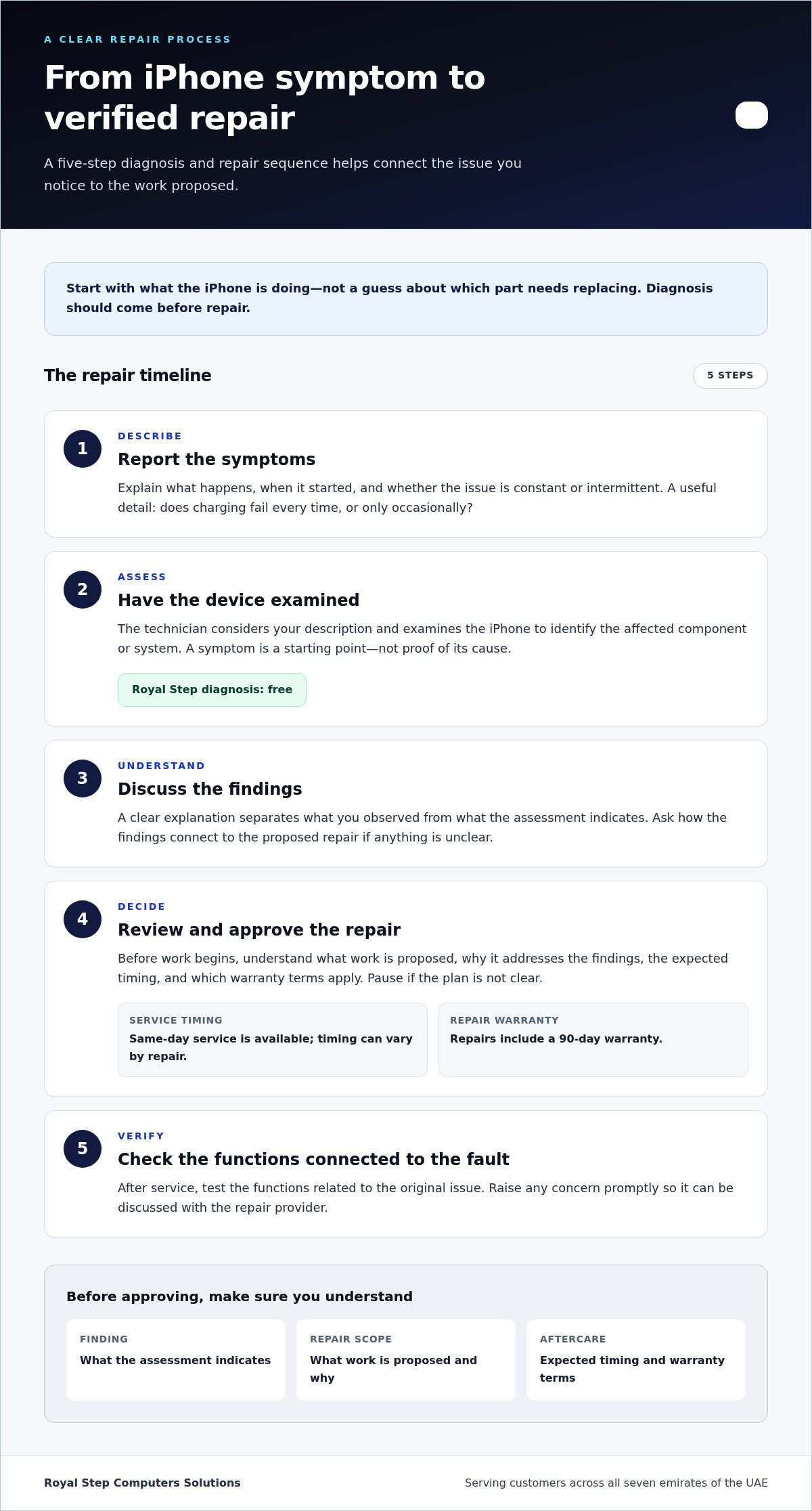
A useful repair decision follows a clear sequence: describe what the iPhone is doing, have a technician assess it, review the findings and options, approve the work, then check the functions affected by the fault. Each stage matters. Skipping diagnosis can lead to a repair plan based on a symptom rather than its cause.
- Report the symptoms. Explain what happens, when it started and whether the issue is constant or intermittent. For example, note whether charging fails every time or only occasionally.
- Assess the device. The technician considers the reported behaviour and examines the iPhone to identify the affected component or system.
- Discuss the findings. A clear explanation separates what you observed from what the assessment indicates.
- Review and approve the repair. Understand the proposed work, expected timing and applicable warranty terms before work begins.
- Verify relevant functions. After service, check the functions connected to the original issue and raise any concern promptly.
What can an iPhone diagnostic assessment establish?
An assessment helps narrow down where a fault may sit and gives the technician a basis for discussing repair options. It doesn’t treat the first symptom as proof of a particular cause. A phone that won’t charge, for instance, has a charging problem from the user’s perspective, but assessment is needed to identify the underlying issue. Royal Step provides free diagnosis for iPhone repair, so the conversation can begin with the device’s condition rather than a guess.
How should repair options be explained?
The diagnosis should lead to a repair scope that makes sense: what work is proposed, why it addresses the findings, the expected timing and the warranty terms. If anything is unclear, pause before approving the work. Royal Step offers same-day service, but timing can vary by repair, so don’t assume every device will be completed that day. Its repairs include a 90-day warranty.
Diagnosis should come before repair because the right fix depends on the confirmed fault, not just the visible symptom. That principle also helps you compare service routes: understand what the assessment establishes, then weigh the proposed work and coverage. Apple’s Official Apple Repair Services page outlines Apple’s repair options and related support information; it can help you understand that route alongside an independent service.
For a practical next step, note the symptoms in your own words and share them during a free iPhone repair diagnosis. A concise history can help focus the assessment, especially if the fault comes and goes.
Apple Service or Independent iPhone Repair: Understand the Difference
Choosing between Apple service and an independent workshop depends on what matters for your device: the service route, the technician’s credentials, the diagnosis process and the warranty terms. Compare the details, not just the labels. The word “certified” can describe a technician’s credentials without meaning that the business itself is an Apple-authorised provider.
What does Apple-certified technician mean?
Apple-certified technician describes a technician-related credential. It does not, by itself, establish that the repair business is an Apple Authorized Service Provider or belongs to another Apple repair programme. These are separate claims. A technician’s credential describes the individual; provider authorisation describes the business’s relationship with a repair programme. Neither label alone guarantees a particular repair outcome.
| What to compare | Apple service route | Independent repair route |
|---|---|---|
| Service route | Repair through Apple’s service channels or an Apple-authorised provider. | Repair through an independent business, outside Apple’s own service channels. |
| Technician credentials | Check which service channel will handle the device and what credentials apply. | Look for a precise description of technician credentials; don’t assume these establish provider status. |
| Process | Review the inspection and service options presented for the device. | Understand what the diagnosis identifies and how it informs the proposed work. |
| Warranty | Understand how the service relates to any existing Apple coverage and what terms apply. | Review the repair warranty’s duration and coverage for the work performed. |
Which repair route fits your situation?
Start with your priorities. If you want to use Apple’s service channel, review its repair options and any coverage that applies to your iPhone. If considering an independent workshop, weigh its diagnosis, technician credentials, repair explanation and warranty. Apple’s service information and independent iPhone repair guides and resources offer different perspectives on repair routes and device repairability.
Then compare what you’ll know before approving work. Can you understand the proposed scope? Are timing expectations and warranty terms clear? Does the service route suit your device’s coverage and your preferences? These questions help you make a practical choice without treating one route as right for every fault.
Royal Step provides iPhone repair with Apple-certified technicians, free diagnosis and a 90-day warranty. These details let you assess the service on its stated merits, while keeping technician credentials distinct from provider-program membership. For customers across the UAE, diagnosis is a starting point for understanding the device’s issue before deciding how to proceed.
Before and After iPhone Repair: Prepare Your Device and Check the Work
A little preparation makes an iPhone handover clearer and helps you assess the repair when the device is returned. Record the fault in practical terms, protect important information and keep track of anything you leave with the phone. After service, focus your checks on the reported issue and the repair details you were given.
How can you prepare an iPhone for repair?
Before handing over your iPhone, back up important data and write down what you’ve observed. Note when the fault occurs, how often it happens and what you’ve already tried. Intermittent issues can be harder to describe from memory. Follow device-security steps that suit your circumstances, and understand any instructions provided for the repair handover.
- Back up important data before service, so you have a copy of information you rely on.
- Describe the symptoms with useful details, such as whether a problem happens every time or only occasionally.
- List steps already tried to avoid relying on memory during the handover.
- Record accessories handed over, such as a cable or case, and make clear which items are included.
- Consider device security in light of your personal circumstances. Don’t share account credentials casually; follow relevant service instructions and understand any request involving access to the device.
If you’re preparing for Royal Step’s free iPhone diagnosis, a concise symptom note and clear record of accessories can help make the initial handover more organised.
What should you check when the repair is complete?
Start with the function connected to the original fault. If the issue involved charging, check charging; if it involved touch response, test the affected part of the screen. Review the repair explanation and the 90-day warranty terms provided, including which work the coverage relates to. Don’t assume unrelated functions or water resistance are unchanged; avoid testing water resistance by exposing the phone to liquid.
Keep the repair information somewhere easy to find. If the same symptom appears again, you’ll have a useful record of the service and its warranty terms. Describe what you notice and when it happens, rather than trying to identify a new cause yourself. Clear notes help distinguish a returning fault from a different issue.
A final check doesn’t need to become a full technical inspection. Test the function that prompted the repair, review the agreed work and make sure you understand the aftercare information. If something doesn’t seem right, raise it promptly and explain the specific behaviour you observed. This keeps the conversation focused and gives the technician a clear point to assess.
Preparation and a targeted check give you a more useful handover and a clearer way to review the repair. Keep your backup, symptom notes and warranty details together until you understand the service provided.
Royal Step iPhone Repair: Diagnosis, Service, and Clear Next Steps
A dependable repair starts with understanding the fault, not guessing at a fix. Royal Step provides iPhone repair across the UAE, with Apple-certified technicians and free diagnosis. That gives you a clear first step: describe what the device is doing, have it assessed, then consider the proposed repair before deciding how to proceed.
What can customers expect from Royal Step?
The service combines diagnosis, repair and defined aftercare. Royal Step’s technicians are Apple-certified, diagnosis is free, and repairs come with a 90-day warranty. Same-day service is available, although completion on the same day isn’t promised for every repair. Royal Step serves customers across all seven emirates, making it a UAE-wide option for iPhone support.
Use the diagnosis to describe the issue clearly and understand the next step. It can help move the conversation from a visible symptom, such as a screen that stops responding or a device that won’t charge, toward an informed discussion of the repair. Share when the problem began, whether it happens consistently and what you’ve already noticed. You don’t need to identify the cause yourself.
- Diagnosis: Free assessment gives you a starting point for understanding the issue.
- Technicians: Apple-certified technicians handle the service.
- Timing: Same-day service is available, but not every repair will necessarily be completed that day.
- Aftercare: Repairs include a 90-day warranty.
- Coverage: Service is available across all seven emirates of the UAE.
How to take the next step
Keep the next step simple. Share the iPhone model if you know it, describe the fault in everyday language and mention when it occurs. If the issue comes and goes, say so. This gives the diagnosis useful context without requiring you to troubleshoot the device or make assumptions about which component has failed.
Once the device has been assessed, use the findings to understand the proposed repair and relevant timing. Get a clear explanation before proceeding, and keep the 90-day warranty information with your repair details. Same-day service can be helpful when timing matters, while a clear diagnosis keeps the decision grounded in the device’s condition rather than a rushed guess.
If your iPhone needs attention, arrange an iPhone diagnosis or repair with Royal Step. Share the issue and take the next step with a free diagnosis, Apple-certified technicians and a 90-day warranty on repairs.
Make Your Next Repair Decision with Confidence
A fault doesn’t have to force an immediate decision about replacing your phone. Start by understanding what the device needs, then consider whether the proposed repair fits your priorities and how you use it. A clear assessment gives you a practical basis for deciding, without relying on assumptions about the cause or the fix.
For your iphone repair, keep the next step straightforward: describe the issue, share when it happens and use the diagnosis to guide your decision. You can then move ahead with a clearer understanding of the service being discussed and what to expect from the process.
Arrange your iPhone diagnosis with Royal Step and take an informed first step toward resolving the issue. With a clear starting point, you can choose what works for your device and get back to your routine with confidence.
Frequently Asked Questions
How long does iPhone repair usually take?
There isn’t one fixed timeframe for every repair. The time depends on the fault and the work identified after assessment. A straightforward issue may follow a different timeline from a fault that needs more extensive repair. Royal Step offers same-day service, but completion that day isn’t guaranteed for every device. Use the expected timing for your repair once the scope is clear, and plan around that estimate.
Will iPhone repair erase my data?
Not every repair involves erasing data, but you shouldn’t assume your information will remain untouched during service. The effect can depend on the repair and the device’s condition. If the phone still works, save anything important before handing it over. If it won’t turn on or you can’t access your information, tell the technician; don’t attempt repeated resets or other steps that could change the device’s state.
Should I back up my iPhone before a repair?
Yes, back up your iPhone before repair whenever you can access it. Check that the backup has completed rather than relying on a previous one, especially if you’ve recently added photos, messages or work files. If the phone is unusable, explain that when arranging service and avoid steps that might overwrite or remove information. A backup is a sensible precaution, not a prediction that the repair will erase data.
Can Face ID stop working after an iPhone repair?
Yes, Face ID may stop working or behave differently after a repair, depending on the fault and work involved. That doesn’t mean every repair affects it. Before service, mention any existing Face ID problem; after collection, test it if practical and report a change promptly. Avoid assuming the cause. A technician can assess whether the new symptom relates to the original fault, the repair or another issue.
Does an iPhone remain water-resistant after repair?
You shouldn’t assume an iPhone’s water resistance is unchanged after repair. The device’s condition and the work performed can matter, and water resistance isn’t the same as being waterproof. Don’t test it by exposing the phone to water. If liquid exposure is a concern, explain the circumstances during diagnosis. Keep the device away from moisture unless you have clear, device-specific guidance about its condition after service.
What does a 90-day repair warranty cover?
A 90-day repair warranty is a stated warranty period, but the exact coverage depends on the terms provided for the repair. Review the warranty information to understand which work it applies to and how to raise a concern. Royal Step provides a 90-day warranty on repairs. Keep the repair record and warranty details together so you can refer to them if you need follow-up about the service.
Can I get same-day iPhone repair in the UAE?
Same-day iPhone repair is available through Royal Step, but not every repair will be completed on the day it’s assessed. The fault and repair scope affect timing, so use the estimate for your device rather than assuming all jobs take the same time. Royal Step serves customers across the UAE. Sharing the symptoms clearly helps the team begin with a useful picture of the issue.