

What if a fading battery isn’t the only thing to check before booking a repair? The right iphone battery replacement starts with a diagnosis, followed by careful device handling and checks after the new battery is fitted. If your iPhone drains quickly or shuts down unexpectedly, it helps to understand what may be causing the problem and what the repair involves before handing it over.
It’s reasonable to be cautious about your data, parts and the difference between manufacturer and independent repair options. This guide explains what a professional replacement typically involves, how to back up and prepare your iPhone, and what to review when you get it back. You’ll also learn how to compare service information, including warranty terms and post-repair checks.
Royal Step Computers Solutions provides iPhone repair with free diagnosis and Apple-certified technicians. The process begins with an assessment, helping establish the repair scope before work starts. This guide walks through the repair journey, practical preparation and the checks that help you understand the work performed.
Key Takeaways
- An iphone battery replacement replaces the battery, but it won’t resolve unrelated hardware or software faults.
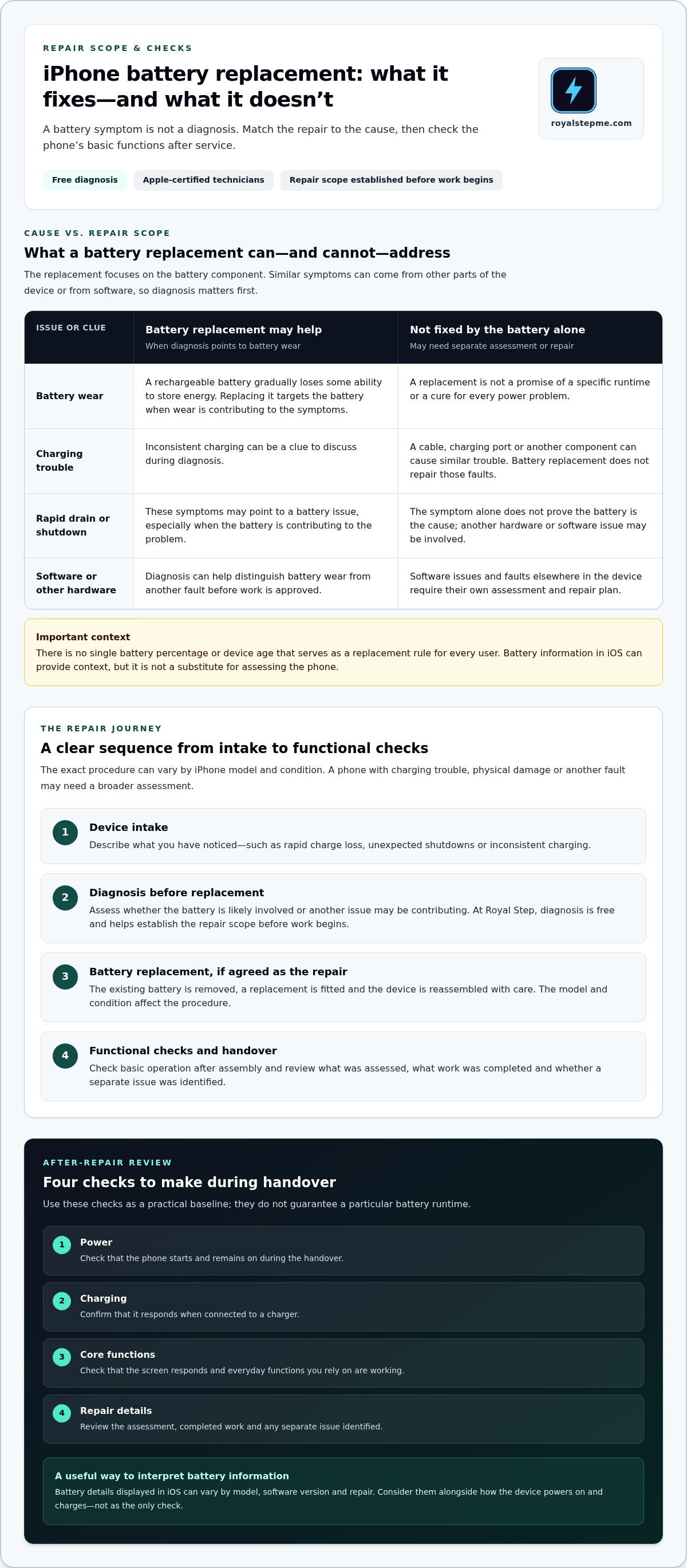
- A typical repair includes device intake, diagnosis, battery replacement and functional checks. The steps vary by model and condition.
- Compare service options by technician credentials, diagnostic process, warranty terms and clarity about the work and parts.
- Back up important data before service and follow Apple’s current guidance for account and device security.
- Royal Step’s iPhone repair includes free diagnosis and Apple-certified technicians to assess the device and explain the repair scope.
What iPhone Battery Replacement Does, and What It Does Not Do
A battery that runs down faster than it used to can make an iPhone harder to rely on. But the symptom alone doesn’t prove the battery is the cause. A charging cable, charging port, software issue or another hardware fault can create similar problems, so diagnosis matters before replacing a component.
iPhone battery replacement means removing the device’s existing battery and fitting a replacement battery. It does not mean repairing every fault that affects charging, power or performance. The battery is one part of a larger device. For general background on the device itself, see this overview of the iPhone.
How iPhone battery ageing affects everyday performance
iPhones use rechargeable lithium-ion batteries. With use, a battery gradually loses some of its ability to store energy. That can mean less time between charges, even when you use the phone in much the same way. Usage intensity, charging patterns, device age and operating conditions can all affect how battery behaviour changes.
Some change over time is normal, and there’s no single percentage or age that applies as a replacement rule for every user. A sudden shutdown, inconsistent charging or rapid drain may point to a battery issue, but it can also have another cause. A technician’s assessment can help distinguish gradual battery wear from a separate fault.
What a battery replacement can, and cannot, address
A replacement addresses the battery component. It may be appropriate when diagnosis indicates that battery wear is contributing to the symptoms. It doesn’t repair a damaged charging port, resolve a software problem or fix faults elsewhere in the device. Those issues need their own diagnosis and repair plan.
Consider the pattern, not just one moment: does the phone repeatedly lose charge sooner than expected, or does it fail to charge reliably with different charging equipment? These clues help describe the issue, but they aren’t a diagnosis. A replacement also isn’t a promise of a specific runtime or a cure for every power problem.
During an iphone battery replacement, the repair focuses on removing the old battery and fitting another one. The precise procedure depends on the iPhone model and its condition. Before approving work, make sure the diagnosis and repair scope are clear. If symptoms could indicate a different fault, that distinction helps you understand what the proposed repair is meant to address.
- Battery wear: the device’s stored charge declines gradually over time.
- Charging trouble: a fault may involve the cable, port or another component, not just the battery.
- Software-related behaviour: settings or software issues may affect how the phone behaves and require separate assessment.
The key is to match the repair to the cause. A clear diagnosis helps avoid treating battery replacement as a catch-all fix and gives you a practical basis for deciding what to do next.
What Happens During a Professional iPhone Battery Replacement?
A professional repair should follow a clear sequence: record the device and reported symptoms, diagnose the issue, replace the battery if that’s the appropriate repair, then check the phone’s basic functions. The exact procedure can vary by iPhone model and the device’s condition. A phone with charging trouble, physical damage or another fault may need a broader assessment.
Diagnosis comes before replacement because the same symptom can have different causes. The repair should match the fault rather than guess at it. This step helps define what the proposed work is intended to address before the technician proceeds.
Diagnosis before the repair
At intake, describe what you’ve noticed, such as whether the phone loses charge quickly, shuts down unexpectedly or charges inconsistently. A technician can assess the device and consider whether the battery is likely involved or another issue may be contributing. Royal Step offers free diagnosis as part of its iPhone repair service, helping establish the repair scope before work begins.
Battery information displayed in iOS can provide context, but it isn’t a substitute for assessing the phone itself. The screens and details available can vary by model and software version. For manufacturer guidance on battery performance and ageing, see Apple's guide to maximizing iPhone battery performance.
Installation and post-repair checks
Once replacement is the agreed repair, the technician removes the existing battery, fits the replacement and reassembles the device with care. The model and condition of the iPhone affect the procedure. A professional repair should also include functional checks after assembly, not just confirmation that the phone powers on.
After the repair, review the phone’s basic operation and ask for a clear handover. Battery information shown in iOS may differ depending on the model and repair. Don’t rely on one screen or indicator alone; consider it alongside how the device powers on and charges.
- Power: Check that the phone starts and remains on during the handover.
- Charging: Confirm that it responds when connected to a charger.
- Core functions: Check that the screen responds and everyday functions you rely on are working.
- Repair details: Review what was assessed, what work was completed and whether any separate issue was identified.
These checks provide a useful baseline, but they can’t guarantee a particular runtime or prove that every possible fault has been ruled out. If the original symptom continues, describe exactly what you’re seeing so it can be assessed rather than assuming the battery replacement resolved a separate issue. For a structured assessment by Apple-certified technicians, explore Royal Step iPhone repair.
How to Compare iPhone Battery Replacement Service Options
Choosing a service route is about more than the label on the repair. Manufacturer service and independent repair are different options. Either way, a useful comparison starts with clear information: who will handle the device, how the fault will be assessed, what work is proposed and what assurance applies after service.
For an iphone battery replacement, compare the repair process rather than relying on broad claims about speed, quality or battery type. A clear explanation connects the reported symptoms to the diagnosis, defines the repair scope and describes the checks performed after the work. If the explanation is vague, it’s harder to know what the service includes.
Credentials, diagnosis, and warranty
Technician credentials offer context about training, but they shouldn’t be confused with a company’s authorisation status. Royal Step’s iPhone repairs are carried out by Apple-certified technicians. This describes technician credentials, not Apple Authorized Service Provider status.
Diagnosis matters because battery symptoms can overlap with other faults. Royal Step provides free diagnosis to assess the device before repair. A clear service process should identify the issue being addressed and explain the proposed work before it begins. That gives you a practical basis for understanding what the repair is intended to resolve.
Warranty terms are another comparison point. Royal Step advertises a 90-day warranty. The stated period is one part of the service information, not a promise that every possible issue is covered. The specific terms define the warranty’s scope, so keep the service details provided with the repair for reference.
What battery and service claims should mean
Manufacturer service and independent repair should be described accurately, without assuming that one route always suits every device or concern. Battery descriptions also need precision. Words such as “genuine,” “original” or “premium” can imply specific sourcing or standards. A useful explanation should state exactly what those terms mean for the repair instead of relying on labels alone.
Look for a service description that makes these points understandable:
- Diagnosis: What was assessed, and why is battery replacement the proposed repair?
- Parts wording: How is the battery described, and what evidence or details support that description?
- Repair scope: What work is included, and are separate faults distinguished from the battery issue?
- Post-repair checks: Which basic functions are checked before the device is handed back?
- Warranty: What period is stated, and where can you review its applicable terms?
These points help separate specific service information from promotional language. Royal Step’s free diagnosis and Apple-certified technicians provide a clear starting point for iPhone repair. For details, review the iPhone repair service and its stated repair process.
How to Prepare Your iPhone for Battery Replacement
A few practical steps make the handover clearer and help protect your information. Back up important data, note what the phone has been doing, and follow Apple’s current guidance for account and device security. Preparation doesn’t guarantee that no issue will arise, but a recent backup gives you a way to restore your information if an unexpected service issue affects the device.
Back up data and prepare device access
Before an iphone battery replacement, check that your photos, contacts, messages and other important information are included in a current backup. Use the backup method you normally rely on, then check its status rather than assuming it completed. If you use cloud storage, make sure the phone has finished syncing the data you need. A backup is a precaution, not a promise that data will be preserved during repair.
Apple’s instructions for preparing an iPhone for service can change. Review its current guidance for Find My, account settings and any other security steps that apply to your model and repair. Follow those instructions before handing over the device. Keep your passcode and account credentials private; don’t include them in a note or share them casually. If a repair process requires access to the device, handle that securely and according to Apple’s guidance.
Record symptoms and arrange the handover
A short symptom record helps make the initial assessment more useful. Note when the problem occurs and what you observe, such as charging that starts and stops, unusually rapid drain, unexpected shutdowns or a warning shown on screen. Include whether the behaviour happens consistently or only in particular circumstances. This gives the technician specific information to assess instead of a general report that the battery “isn’t working.”
It’s also useful to record the phone’s visible condition before service. Note existing cracks, marks or other damage, and make a brief record for your own reference. Remove the case and accessories you don’t need to hand over. Bring the device and relevant repair details, including any warning message or troubleshooting steps you’ve already tried.
- Back up: Confirm that important data is backed up or synced.
- Secure: Follow Apple’s current account and Find My guidance; keep credentials private.
- Document: Write down symptoms, warnings and visible device condition.
- Prepare: Remove unnecessary accessories and keep relevant repair information together.
Royal Step advertises same-day service. Timing depends on the device’s condition and repair requirements, so same-day completion is not guaranteed for every replacement. For an iPhone assessment and repair, arrange iPhone repair with Royal Step.
IPhone Battery Replacement at Royal Step: A Clear Next Step
If your iPhone battery drains quickly, charges inconsistently or shows another power-related symptom, the practical next step is to establish what’s causing it. A diagnosis can help distinguish battery wear from a separate issue and clarify what repair is appropriate. That gives you a defined repair scope before work begins, rather than assuming every power problem calls for a battery replacement.
Royal Step Computers Solutions provides iPhone repair with free diagnosis and Apple-certified technicians. The service starts with understanding the symptoms and assessing the device. If battery replacement is the recommended repair, the scope should be clear before work proceeds. Afterward, basic checks help review the phone’s operation and the work completed.
What to expect when you arrange service
Be ready to describe what you’ve observed, such as when the charge drops, whether the phone responds consistently to charging, or whether a warning appears. These details help frame the assessment. Diagnosis informs the repair recommendation; it doesn’t mean every issue will have the same cause or solution. A clear explanation of the findings helps you understand what the proposed work is meant to address.
Royal Step advertises same-day service and a 90-day warranty. These are stated service features, not a promise that every repair will be completed on the same day or that every possible issue is covered. Refer to the terms provided with the repair to understand the warranty’s scope.
Choose a practical next step
A sound decision rests on three things: diagnosis before repair, qualified technicians and clear service information. Royal Step’s free diagnosis helps assess the device, while Apple-certified technicians handle iPhone repairs. After the work, review the repair details and check basic functions such as power and charging. This gives you a straightforward way to understand what was done without assuming the repair guarantees a particular battery runtime.
Before arranging service, note the symptoms and any device warnings so you can describe them clearly. If your phone has more than one issue, mention each one. Diagnosis can help establish whether the battery is the main concern or whether another fault needs attention. The goal is a repair recommendation that matches the device’s condition.
If battery behaviour is disrupting daily use, arrange an assessment rather than guessing at the cause. Arrange an iPhone battery diagnosis with Royal Step and take a clear, practical next step toward resolving the issue.
Make Your Next Repair Decision With Confidence
A battery problem can disrupt routines, but you don’t have to guess at the fix. Use what you’ve noticed to explain the issue clearly, then let a diagnosis guide the next step. If the assessment points to an iphone battery replacement, you’ll have a clearer basis for deciding whether to proceed. If it reveals another cause, you can focus on the repair that matches the problem.
Royal Step’s iPhone repair service starts with assessment and a clear repair scope. Apple-certified technicians and free diagnosis support that first step. The service also advertises same-day service and a 90-day warranty. Neither means every repair will be completed the same day or that every issue falls within warranty terms.
Ready to take the uncertainty out of the decision? Arrange an iPhone battery diagnosis with Royal Step and move toward a practical repair plan.
Frequently Asked Questions
How long does an iPhone battery replacement take?
An iPhone battery replacement may be completed the same day, but the exact timing depends on the model, the device’s condition and the repair assessment. Royal Step advertises same-day service, but that doesn’t guarantee every repair will be finished that day. If you rely on your phone for work, plan how you’ll stay reachable during the repair.
Will I lose my data during an iPhone battery replacement?
A battery replacement isn’t intended to erase your data, but no repair process should be treated as a data-preservation guarantee. Back up the iPhone before service. Check the backup’s completion time, and make sure important items such as recent photos have finished syncing. Keep your passcode and account credentials private. If you use the phone for work, check that essential files are available from another device or account.
Does an iPhone battery replacement fix fast battery drain?
It can help if the battery is the cause of the fast drain, but it won’t resolve every cause. High app activity, software behaviour or another device fault may also contribute. For example, if drain began after installing an app or updating iOS, note that timing for the technician. Diagnosis can help determine whether battery replacement is relevant or whether the symptom needs a different fix.
Can an iPhone battery be replaced without replacing the phone?
Yes. Battery replacement is a component repair, so the phone itself doesn’t automatically need replacing. Whether it’s a sensible option depends on the iPhone model, battery condition and any other faults found during assessment. If the screen is damaged or charging is unreliable, mention both issues. That helps the technician consider the device as a whole and explain whether battery work alone is appropriate.
What should I do if my iPhone battery is swollen?
Stop using and charging the phone, and arrange professional assessment. Don’t press the screen or case back into place, puncture the battery or try to remove it yourself. Keep the device away from heat and avoid placing pressure on it. Swelling can push against other components, so treat it as a physical safety concern rather than a routine battery-drain symptom.
Why does my iPhone show a battery message after replacement?
A message may appear if iOS can’t verify or display information about the installed battery in the usual way. Its wording and effect can depend on the iPhone model, software version and repair. Read the full message rather than assuming it means the phone has failed. Keep the repair details, then have the device assessed if the warning comes with charging problems, shutdowns or other new symptoms.
How much does iPhone battery replacement cost?
There isn’t one price that applies to every iPhone battery replacement. The model and assessment affect the repair scope, so a useful estimate should be based on the device and the work proposed. Make sure you understand what the quoted amount covers before approving the repair. This helps you compare service details without relying on a generic price range.
Does AppleCare cover iPhone battery replacement?
AppleCare+ may cover battery replacement at no additional charge when the battery’s maximum capacity has fallen below 80% of its original capacity, subject to the active plan’s terms. Check your coverage and the battery information shown on your device, then review Apple’s current service guidance. If your plan is inactive or the battery doesn’t meet that condition, coverage may differ, so verify the applicable terms before arranging service.
