

What if the most important step in MacBook repair UAE isn’t replacing a part, but getting a clear diagnosis first? A dark screen, fast-draining battery, keyboard fault or sudden shutdown can have several possible causes. Guessing can lead to unnecessary repairs, lost work time or avoidable worry about your files.
Before handing over a device you rely on, it’s reasonable to want to know what’s wrong and what the repair involves. A clear process explains the diagnosis and available repair options so you can make an informed decision.
This guide covers common MacBook repair options, what to expect during diagnosis, and how to prepare your device, including backing up important files and turning off Find My Mac when appropriate. You’ll also learn what to look for in a repair service across the UAE. Royal Step Computers Solutions serves homes and businesses across the country with Apple-certified technicians, free diagnosis, same-day service and a 90-day warranty. The aim is simple: help you understand the process and choose your next step with confidence.
Key Takeaways
- Recognize when repeated shutdowns, charging problems or display faults call for professional MacBook diagnosis.
- Understand how a structured assessment can distinguish hardware faults from software or power-related causes.
- Compare manufacturer, authorized and independent repair routes by service scope, expertise, communication, warranty terms and convenience.
- Prepare for MacBook repair UAE by backing up important files when possible and following a practical pre-service checklist.
- Know what to expect from Royal Step’s repair process across the UAE before deciding on your next step.
MacBook repair in the UAE: when does a fault need professional diagnosis?
A MacBook that shuts down repeatedly, won’t charge reliably, shows a distorted image or suddenly runs unusually slowly deserves attention. One brief slowdown or isolated app freeze may clear after restarting. A fault that returns, worsens or affects basic use is different: it calls for a closer assessment before anyone recommends a repair.
The same symptom can have different causes. Charging trouble, for example, may involve the power adapter, cable, port or the MacBook itself. Slow performance can result from software or hardware issues. A symptom alone isn’t enough to identify a failed component, so don’t treat an online guess as a diagnosis. The model and year can also matter. Apple’s MacBook models and history offers a general overview of the product line.
Diagnosis is the process of testing a MacBook to identify a fault before recommending a repair. For MacBook repair UAE, this distinction helps turn an unclear symptom into an evidence-based repair plan.
Which MacBook symptoms should prompt a repair assessment?
Look for patterns rather than assuming one sign points to one component. Note whether the problem is recurring, getting worse or interfering with normal use.
- Power: repeated shutdowns, failure to start or unexpected restarts.
- Charging: intermittent charging, no response to a connected charger or charging that stops unexpectedly.
- Display: flickering, lines, dark areas or an image that disappears while the MacBook is running.
- Input: keys or trackpad responses that are inconsistent or absent.
- Performance: recurring freezes, unusual slowness or persistent crashes.
A single glitch may be temporary, particularly if it disappears after restarting and doesn’t return. Repeated symptoms deserve assessment, even if the MacBook works between incidents. A technician can test for software, power-related and hardware causes instead of relying on the symptom alone.
What should you do before a fault gets worse?
Reduce risk first. If the MacBook is unusually hot, physically damaged or has been exposed to liquid, power it down and stop using it. Don’t connect a charger to a liquid-exposed device or keep restarting it to see whether it recovers. Continued power can worsen damage.
- Record when the issue began and how often it occurs.
- Note anything that changed beforehand, such as an update, impact, liquid exposure or new accessory.
- Describe what you observe, including warning messages, unusual sounds or changes in charging.
- Avoid opening the case or attempting component-level fixes without suitable expertise.
These details help a technician reproduce the problem and narrow down what needs testing. If the device is stable and usable, protect important files before service. If it’s hot, damaged or liquid-exposed, leave it powered down and prioritize assessment over further use.
How MacBook diagnosis works: from reported symptom to repair plan
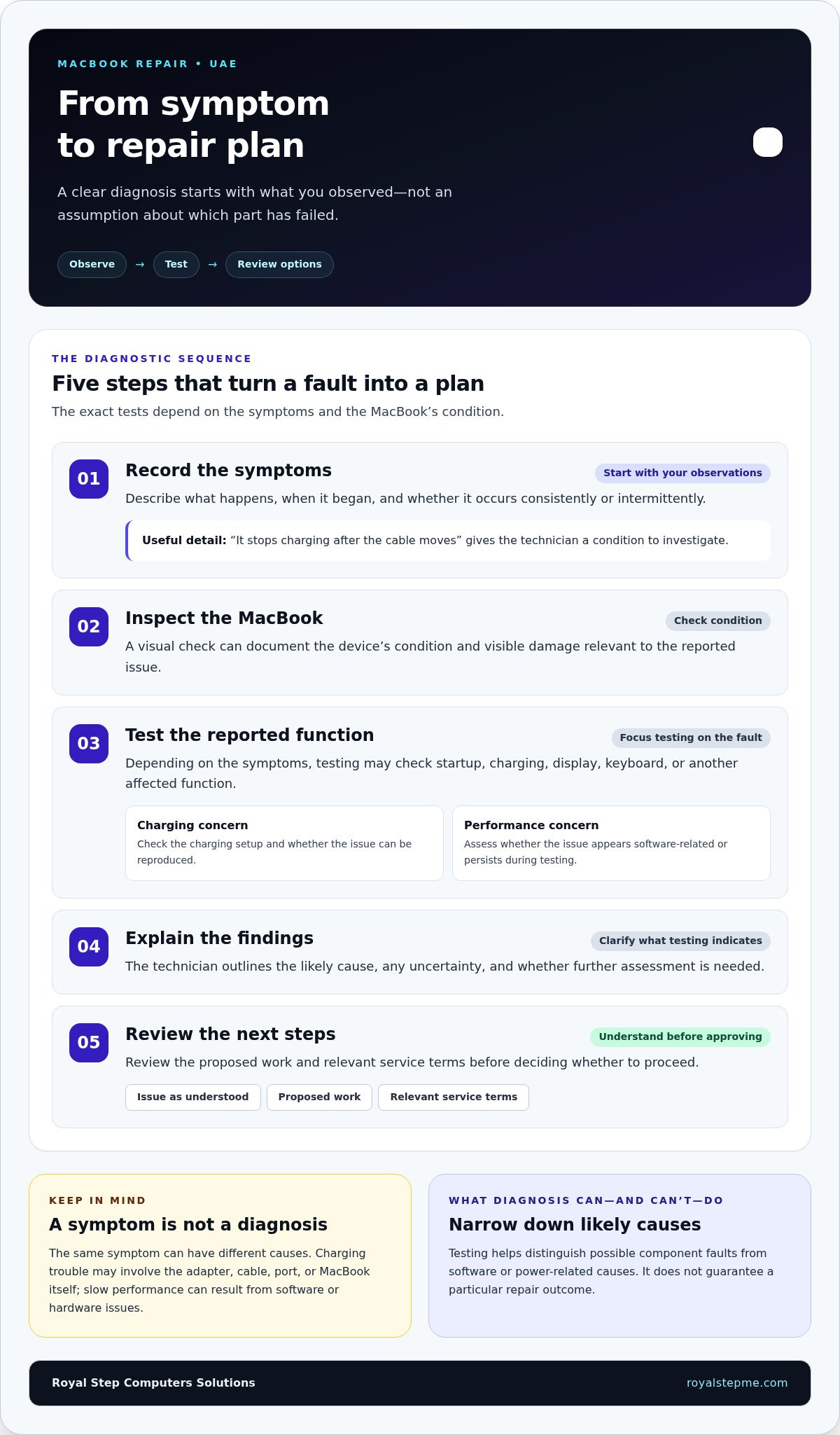
A useful repair process starts with the problem you’ve observed, not an assumption about which part has failed. The technician uses your description to guide inspection and testing, then explains what the findings indicate. This helps distinguish a possible component fault from a software issue, power supply problem or another cause, so you can review a repair plan before authorizing work.
The assessment generally follows a clear sequence:
- Record the symptoms. Describe what happens, when it began and whether it occurs consistently or intermittently.
- Inspect the MacBook. A visual check can document its condition and any visible damage relevant to the reported issue.
- Test the reported function. Depending on the symptoms, this may involve checking startup, charging, display, keyboard or other affected functions.
- Explain the findings. The technician outlines the likely cause and any uncertainty or need for further assessment.
- Agree on next steps. Review the proposed work and relevant service terms before deciding whether to proceed.
What happens during a MacBook diagnostic assessment?
Testing should focus on the reported fault and the device’s condition. For charging trouble, for example, an assessment may examine the charging setup and check whether the problem can be reproduced. If performance is the concern, the technician may assess whether the issue appears software-related or persists during testing. The exact scope depends on the symptoms. Diagnosis narrows down likely causes, but it doesn’t guarantee a particular repair outcome.
Share precise observations rather than a guess about the cause. “It stops charging after the cable moves” gives the technician a useful condition to investigate. Include warning messages or circumstances that affect the fault. If the symptom can’t be reproduced during assessment, that information can help determine what to test next.
How do diagnostic findings shape the repair plan?
Test results inform the recommended route. The plan should identify the issue as understood, describe the proposed work and make the relevant service terms clear. If testing points to more than one possible cause, further assessment may be needed before a specific repair is recommended. Parts, the device’s condition and the complexity of the fault can all affect the options and timing.
Before approving work, make sure you understand what the proposed repair covers. Ask for the findings in plain language, the scope of the work, the expected cost and timing, and the applicable warranty terms. If the recommendation changes after further testing, review the revised plan before authorizing additional work. Clear communication helps you make a decision without mistaking a preliminary finding for a confirmed result.
This approach keeps the decision tied to evidence, not guesswork. For MacBook repair UAE, Royal Step Computers Solutions offers free diagnosis to help clarify the repair path. Learn about Royal Step MacBook repair as a practical next step.
MacBook repair options compared: how to assess service routes
There’s no single repair route that suits every MacBook fault. Manufacturer support, an authorized service provider and an independent repair service each have a different setup. Compare the proposed scope, diagnostic explanation, warranty terms and handover arrangements, then weigh them against your device’s condition, existing coverage and priorities.
| What to compare | Manufacturer support | Authorized service | Independent repair |
|---|---|---|---|
| Service scope | Handled through the manufacturer’s service process. | Service delivered by a provider authorized by the manufacturer. | Scope varies by repair business and the fault assessed. |
| Technician expertise | Ask how the reported issue is assessed within the manufacturer’s service route. | Consider the provider’s authorization and experience with the relevant MacBook repair. | Look for relevant Mac repair experience and a clear account of diagnostic testing. |
| Communication | Review how findings, proposed work and costs are explained. | Look for a clear explanation of the diagnosis and repair plan. | Expect the same clarity about findings, proposed work and next steps. |
| Warranty terms | Terms depend on the device’s coverage and the service offered. | Review the terms for the specific repair. | Review the repair warranty and what it covers. |
| Convenience | Consider the available booking and handover process. | Consider access and how you’ll hand over and collect the device. | Compare the service’s handover arrangements with your needs. |
What should you compare between MacBook repair services?
Start with relevant Mac repair experience, then assess how clearly the technician explains the diagnosis. The proposed work should match the findings, and the service should state applicable warranty terms plainly. Practical details matter too: a handover arrangement that fits your schedule and work needs can make a repair easier to manage.
When might each service route suit you?
Manufacturer support may suit someone who prefers to follow the maker’s service process, particularly if device coverage is a factor. An authorized provider offers a route through a business authorized by the manufacturer. An independent service may suit someone comparing repair scope and communication with a separate repair business. None is automatically best. Match the route to your MacBook, its coverage, the fault and your priorities.
For MacBook repair UAE, Royal Step Computers Solutions provides independent MacBook repair with Apple-certified technicians, free diagnosis, same-day service and a 90-day warranty. Include these details in your comparison, alongside the diagnosis and repair plan, rather than choosing on convenience alone.
How to prepare your MacBook for repair and protect your data
A little preparation makes assessment and handover clearer. If your MacBook is accessible and your files matter, create a current backup before service. Repair work can carry a risk of data loss, so a backup is the safest way to keep important documents, photos and work files available. If the device won’t start or is unstable, don’t keep trying to use it just to make a backup.
Use this checklist before handing over your MacBook:
- Back up important files. Use a backup method you can access, and make sure it has completed before disconnecting it.
- Record the device details. Note the MacBook model if known, along with the reported fault and when it began.
- Describe the pattern. Write down how often the issue occurs, what triggers it and any recent changes, such as an update, impact or new accessory.
- List visible condition and accessories. Note scratches, dents or other damage, and record any charger or accessory you’re including.
- Agree on communication. Establish how you’ll receive diagnostic findings, proposed work and updates, and who should be contacted before additional work is considered.
How can you prepare files and account access?
Back up what matters whenever the MacBook is usable. Don’t treat any repair process as a promise that files will remain untouched. For account access, follow the service provider’s secure instructions and share only what’s necessary for the agreed assessment. Don’t send passwords through an unsecured message. If access is needed for testing, understand how it will be used and agree on a safe way to provide it.
Remove personal accessories that aren’t needed for the reported fault, such as external drives or memory cards. Keep a note of anything you leave with the device. If the MacBook contains sensitive work files, consider your organization’s device-handling requirements before service.
What should you document at handover?
Before leaving the device, make sure its visible condition, included accessories and reported symptoms are recorded. Keep a copy of the agreed diagnostic scope and repair plan, including the proposed work and applicable service terms. This gives you a clear reference if the assessment changes after testing.
When the MacBook is returned, check the original fault first, then test essential functions you rely on, such as charging, display, keyboard, trackpad and connectivity. Confirm that included accessories are returned and review the service record. Raise any issue promptly through the agreed communication channel.
Clear notes and a current backup make MacBook repair UAE easier to manage, especially when the device supports daily work. For a structured assessment, arrange a MacBook repair assessment with Royal Step Computers Solutions.
Royal Step MacBook repair across the UAE: what customers can expect
Once you’ve compared service routes and prepared your device, the next step is a repair process that starts by understanding the fault. Royal Step Computers Solutions repairs MacBooks and other Apple devices for homes and businesses across the UAE. Its Apple-certified technicians assess the reported issue and use the diagnosis to guide the next steps, rather than treating a symptom as proof of a specific component failure.
What Royal Step's MacBook repair service includes
MacBook repair is part of Royal Step’s Apple-device repair services. The company offers free diagnosis, same-day service and a 90-day warranty. These service features support the repair process, while the right repair depends on the diagnostic findings. Timing can depend on the issue and work required, so same-day service isn’t a promise that every repair will be completed that day.
Diagnosis helps establish a practical repair path. It can clarify whether the reported problem points toward a repair, calls for further assessment or has another likely cause. Once the findings are available, you can review the recommended work and decide how to proceed. If the assessment changes the original understanding of the fault, the repair plan should reflect that rather than rely on an early assumption.
The 90-day warranty is part of Royal Step’s service. Keep the repair information provided with your service so you can refer to the stated terms later. For MacBook repair UAE, coverage across the country gives home users and businesses a repair option wherever they are in the UAE.
How to take the next step with Royal Step
To get the process moving, share the MacBook model if you know it and describe the fault in a few clear sentences. Include when it began, what you notice and whether it happens consistently. For example, “The MacBook starts, but the display goes dark after a few minutes” gives a more useful starting point than “It’s broken.” You don’t need to identify the failed part yourself.
Royal Step’s diagnosis is intended to clarify the likely issue and guide the repair plan. The findings inform the next steps, but they don’t guarantee a particular repair outcome or fixed completion time. Review the recommended work and service terms before deciding whether to proceed. If the device is ready for handover, your notes about the symptoms and model can help connect the assessment to the problem you’re experiencing.
For Apple-device repair across the UAE, Royal Step offers a straightforward starting point: diagnosis first, then a repair plan based on the findings. Arrange MacBook repair with Royal Step Computers Solutions.
Take the next step with a clear repair plan
A MacBook fault can disrupt work, study and everyday tasks, but you don’t need to know which component is responsible before seeking help. Start with what you can observe: the model, the symptom and when it occurs. A focused assessment can turn that information into a clearer decision about what to do next.
For MacBook repair UAE, choose a next step that keeps you informed and in control. Share the details you’ve recorded, review the recommended work and decide once you understand the repair plan. If the diagnosis points to further assessment, use that information to decide how to proceed rather than relying on guesswork.
Ready to move forward? Arrange your MacBook diagnosis with Royal Step. Start with a clear assessment and a repair plan based on the findings.
Frequently Asked Questions
Can a MacBook be repaired if it will not turn on?
A MacBook that won’t turn on may be repairable, but diagnosis is needed to identify the cause and determine the next step. The issue could involve power delivery, the battery, internal hardware or another fault. Note whether any lights, sounds or screen activity appear when you connect the charger. Avoid repeated restart attempts if the device is unusually hot or damaged, and share these observations during assessment.
Can a MacBook be repaired after liquid damage?
A MacBook exposed to liquid needs assessment, but successful repair or data recovery can’t be guaranteed. Power it down as soon as you can, disconnect the charger and accessories, and don’t turn it back on to test it. Avoid using heat or placing it in rice. Tell the technician what liquid was involved, where it reached the device and roughly when the exposure occurred.
Should I back up my MacBook before taking it for repair?
Yes. If the MacBook is usable, back up important files before service and check that the backup completed. Repair work can involve data risk, so don’t rely on the device’s storage as your only copy. Prioritize work documents, photos and files you can’t easily replace. If the MacBook won’t start or is unstable, avoid repeated attempts to access files and explain the situation during assessment.
How long does MacBook repair take in the UAE?
Repair timing depends on the fault and what diagnosis reveals. Royal Step offers same-day service, but that isn’t a fixed completion time for every repair. A straightforward issue and a fault requiring further testing may follow different timelines. After assessment, use the findings and proposed repair plan to understand the expected timing for your case before authorizing work.
Can files be recovered from a MacBook that will not start?
Possibly, but recovery depends on the device’s condition and the reason it won’t start. Data recovery is a separate assessment from repairing the MacBook, and success can’t be promised in advance. If the files are important, avoid repeated startup attempts or do-it-yourself fixes that could affect the device further. Tell the technician which files matter most and whether you have another backup copy.
Do I need to bring my MacBook charger in for repair?
Bring the charger if the reported problem involves charging, power or intermittent startup. The adapter and cable can help a technician reproduce the issue and assess the full charging setup. For a display or keyboard fault, those accessories may not be relevant. Describe the symptom when arranging service, and include only accessories connected to the reported problem or requested for assessment.
Does Royal Step provide MacBook repair across the UAE?
Yes. Royal Step Computers Solutions provides MacBook repair for homes and businesses across the UAE. Share your MacBook model, if known, and a concise description of the fault to help start the assessment. The diagnostic findings guide the repair plan, while the device’s condition and the issue itself shape the next steps. Arrange MacBook repair with Royal Step.

